
Writing software for my keyboard
There’s a previous post about this keyboard. I’m not going to recap it. The short version is that I bought a SuperFrame Phantom, found out it was a StarTec MKGP98 with a sticker change, and went away happy with it. The long version is here.
This post is what happened next.
The Print Screen problem
The SuperFrame Phantom’s particular flavor of 98% layout drops the dedicated Print Screen key. On a full-size board, Print Screen lives in the three-key cluster above the numpad. On this board, only Del, Ins and End survived. Print Screen has been folded into Fn + Numpad-Slash.
This is fine. This is a thing non-standard-layout keyboards do. It’s also profoundly inconvenient when you take screenshots for work constantly, because the entire point of the numpad cluster is muscle memory. Now I had to look. To take a screenshot.
The fix is obvious: remap a key. Move Print Screen onto something I can hit blind. Done in five minutes on a mechanical keyboard from a normal brand.
The SuperFrame Phantom is not a keyboard from a normal brand.
No software, in the most aggressive sense
There is no Windows app. There is no Linux app. There is no webapp. At best, the product page links to a firmware update tool, hosted on their own CDN, and that tool does exactly one thing, which is push a specific firmware update to the keyboard. It does not remap keys. It does not pretend to.
I tried the obvious alternatives. Aula software. Royal Kludge software. The various “generic” keyboard configurators that support a wide range of brands. None of them recognized the device. None of them offered a “force this to work” option. I’ll come back to why a few sections from now, because the reason is genuinely interesting and I didn’t understand it until much later.
So. No software that works. No webapp that recognizes the device. No way to do the one thing I bought a programmable-looking keyboard to do.
The thing about being a software developer is that “the manufacturer didn’t ship software for this” is a sentence with no weight. The other thing about being a software developer is that this is exactly how every story about losing a month of your life begins.
lsusb again
The keyboard identifies as a SinoWealth StarTec MKGP98. Post 1 covered this. SinoWealth is a Chinese semiconductor company whose product line includes MCUs for keyboards. If you’ve bought a budget mechanical board from anywhere on the AliExpress/Amazon spectrum in the last decade, there’s a very good chance a SinoWealth chip is doing the talking inside it.
This turns out to be good news, because the community already exists. sinowealth-kb-tool is what it sounds like: a tool for reading and writing firmware on SinoWealth keyboards. smk is a clean-room open-source firmware for the same family. Prior art everywhere.
The chip in this keyboard is an SH68F90A. sinowealth-kb-tool supports the SH68F90 platform. Close enough to try.
$ sudo ./sinowealth-kb-tool read --vendor_id 0x258a --product_id 0x019d \
  --platform sh68f90 SuperFramePhantom.hex

Looking for 258a:019d (isp_iface_num=1 isp_report_id=5)
Connected!
Enabling firmware...
Reading... 30/30
Rebooting...
MD5: 202f7a28b1a1466253f87fba7590c3d7
Successfully read 61440 bytes - SuperFramePhantom.hex
Sixty kilobytes of firmware. Off the keyboard. Without opening it.
Reader, I have a hexdump. Fuck.
Wait, what architecture is this?
I spun up a Claude instance and asked it to try to identify the architecture. I expected the task to take a while, for it to come back with a “There’s a 67% chance this firmware is…” follow-up and barrage of questions. Claude did not even took a minute to answer with… an assembly file? And somehow, a “The assembly perfectly recompiles back to the original binary, extracted from the hexdump.” How?
I read the file. It’s assembly. It’s recognizably assembly (registers, jumps, ALU ops), but the mnemonics aren’t quite right. LJMP? MOVX? DPTR? I had to write a small amount of x86 assembly for a college course. I remember enough to recognize the shape of it. This has the shape of it. But this can’t be x86. Full stop.
“Claude, what architecture is this?”
Intel 8051. Intel. In a keyboard. The Pentium people are in my keyboard. I was left wondering how the keyboard didn’t double as a space heater. I looked up the SH68F90A on some dark places on the internet (cof cof a Discord about Sinowealth devices) and found the datasheet. Sure enough, the SH68F90A is an 8051-based microcontroller.
The Intel 8051 is a microcontroller architecture from 1980. Yes, four years before the original Macintosh. It is also, by a comically wide margin, the most-cloned, most-licensed, most-quietly-embedded CPU core in the history of microcontrollers. The original Intel chip is forty-five years old and still being sold. Clones are everywhere. The toolchain is mature. The instruction set is fully documented. And, crucially: I can read it. It looks like x86 the way Portuguese looks like Spanish. Different language, recognizable bones. The college course was preparing me for something I didn’t know existed yet.
This is the part where I realized I was going to learn a lot of things I hadn’t signed up to learn, and that I was going to enjoy it.
Reverse engineering as the long way around to understanding
What I genuinely didn’t appreciate before this project: a microcontroller is not just a small computer. It’s a small computer welded to its peripherals through a register file. Want to read a GPIO pin? It’s at address 0x90. Want to set up a timer? Write a control word to 0xC8, a reload value to 0xCC and 0xCD. The whole architecture of “how does this chip do anything at all” is encoded in the SFR map (Special Function Registers), which is a table of address-to-peripheral mappings specific to this chip. I knew this to some degree, thanks to previous Arduino tinkering, but I didn’t expect how acquainted I would become with all of these concepts in the process of “setting End to Print Screen.”
The 8051 instruction set is generic. The SH68F90A’s SFR map is the part that makes it a keyboard chip. Smk has this map written down in a header file, which I cross-referenced extensively. (Addresses are facts; addresses can be shared. The macros wrapping the addresses are clean-room original. There’s a paragraph of legal pedantry in the project’s README about this.)
The workflow was: take a chunk of disassembly, work out what it does, translate it to C, move on. Reading dense assembly and producing equivalent named C is exactly the kind of task LLMs do well: formally-structured input, formally-structured output, no creativity required, only patience and bookkeeping. So I worked with Claude in the loop, which meant I didn’t have to context-switch into “go look up the 8051 mnemonic for indirect-indexed XDATA load” or “find the MD5 of every known SinoWealth bootloader and figure out which cohort this one belongs to.” I knew the shape of what we were doing. Claude had the specifics I didn’t have memorized. The net result is that a month of careful work became a weekend of velocity.
The thing I want to flag, because it matters: I learned this stuff. I came out of this knowing what an SFR map is. Knowing how a microcontroller dispatches interrupts. Knowing what “this chip has 4 banks of PWM” actually means in instruction-level terms. I started this thinking microcontrollers were small computers. I now think of them as small computers physically wired to do a few specific things very fast, where the firmware is mostly the negotiation between “the CPU” and “the wires.”
A representative chunk, after translation:
// Init the PLL (Phase-Locked Loop), a hardware clock.
void clock_init(void) {
    PLLCON = _PLLON;          // power up the PLL clock
    delay_kick(2000);         // wait ~2000 cycles for PLL to stabilize
    PLLCON = _PLLON | _PLLFS; // lock in the PLL frequency selection
    CLKCON = _HFON | _FS;     // switch core to high-frequency PLL output
}
Twelve lines of original assembly. Four lines of C. The C is obviously clock setup in a way the assembly was not, and that’s the entire point. The C reconstruction wasn’t a parallel project. It was how I understood the firmware. By the time I’d translated about eighty-five percent of it, I knew where the keymap lived, what its format was, and how to write to it.
The (key) map marks the spot
The assembly already have given away where the keymap lived. There was a massive .db section starting at 0xBC00 that Claude quickly correlated as mostly HID keyboards. It was big enough to fit the 97 keys this keyboard has four times. We went digging on the C code and sure enough, we found offset reads all across these raw data banks, and processing further down the line that turned them into USB HID events. Bingo.
I did not need to patch the firmware. I did not need to flash anything. I needed to write a specific enough byte array to a specific address using HID reports.
The keyboard ships with everything it needs to be fully remappable. The protocol exists. The format is regular. The only reason it isn’t remappable in practice is that nobody had written the client.
WebHID, and why no existing tool worked
I wanted this to be as portable as possible. I also knew WebHID was, somehow, a thing. WebHID is a browser API that lets a page talk to USB HID devices, with the user’s permission, directly: the permissions model is good (user picks the device, page never sees devices it wasn’t granted), the API surface is small, and “you write a report, you read a report” is approximately the whole of it. The keyboard protocol is HID reports. The keyboard cannot tell whether a report came from a Rust binary on Linux or a webpage on Chrome.
This is also when I figured out why none of the existing WebHID keymap editors recognized the device.
When a webpage requests a HID device, it has to declare which devices it’s asking for, by USB vendor ID and product ID. Chrome shows the user a picker filtered to that list. This is good security: a webpage can’t enumerate every HID device you own, only the ones it explicitly knows about. It also means every existing WebHID-based keymap editor has a hardcoded list of supported devices, and 258a:019d is on none of them, because nobody outside Brazil has heard of this keyboard.
Since the only way to get a working WebHID app for the SuperFrame Phantom is to make it yourself, I did.
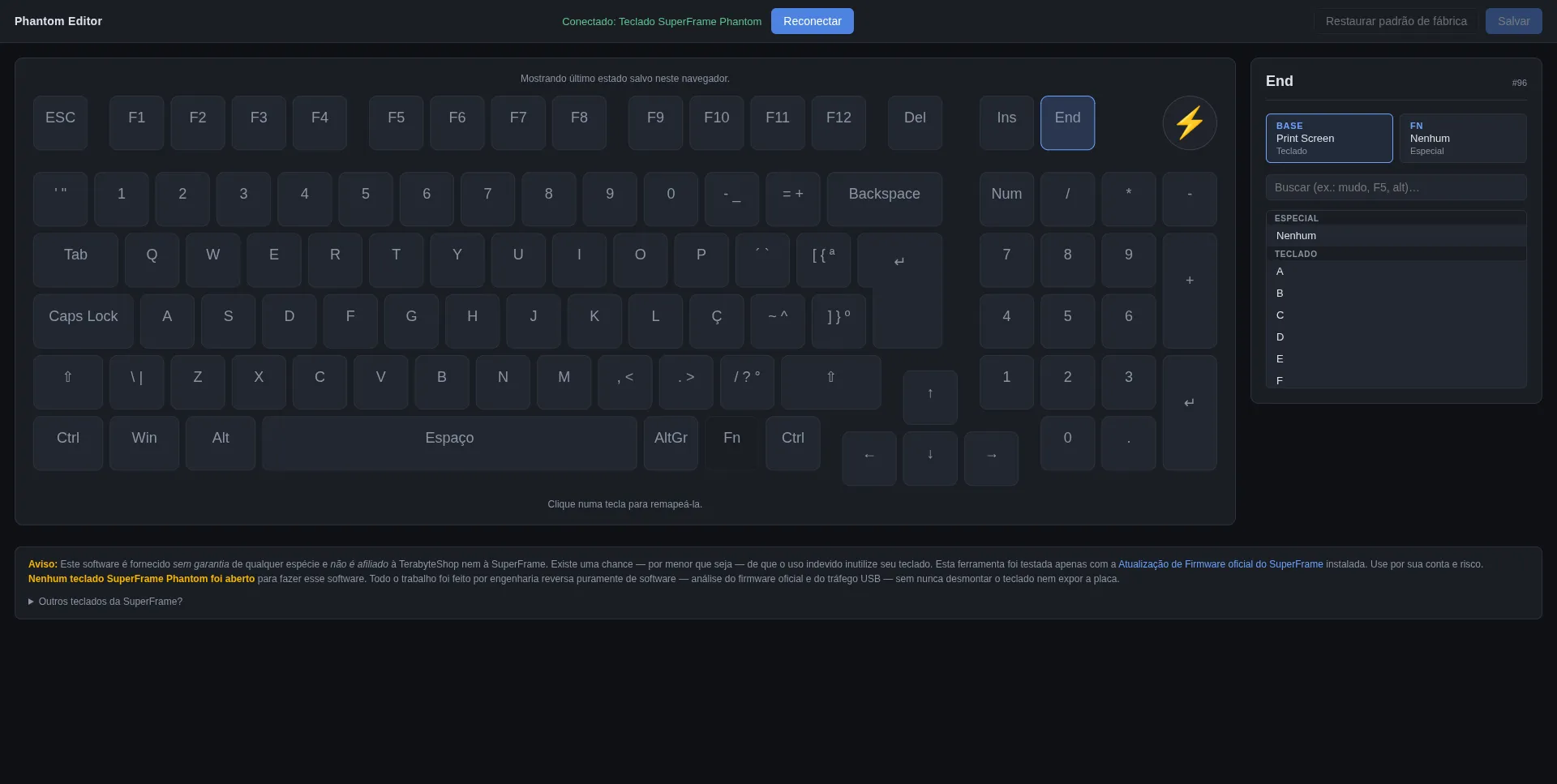
That is a webpage, talking to the SuperFrame Phantom keyboard over USB, letting me pick a key from a dropdown and remap End to Print Screen. It is in Brazilian Portuguese as I figured others would like to use it and we talked about this whole keyboard’s deal in the previous post. Moving on.
End is now Print Screen. I take screenshots without looking again.
The kicker
I never opened the keyboard. The warranty is intact. The firmware is unmodified: the OEM image is byte-identical to what shipped from the factory; the only thing on the device that’s different is 452 bytes of user-keymap, which is exactly the region of flash the keyboard’s own ISP interface exists to let me write to.
The keyboard has no idea anything out of the ordinary happened.
The thing I came out of this project with that I wasn’t expecting (more than the working remapper, more than the C reconstruction, more than the Print Screen on End) is a different relationship with microcontrollers. I now look at an RP2040 spec sheet and read it differently. I read “this MCU has X channels of hardware PWM and Y kilobytes of flash” and translate it in my head into what it can actually do. I understand why people make their own keyboards. I understand, vaguely, what gpio_init.c is doing in any embedded codebase I open.
I wanted to move one key. I learned how a keyboard heart beats.
Cover photo by Félix Girault on Unsplash